¶ dx:softwareType
Essential information to identify the software used to create the digital document.
Which software (incl. version number) was used to create the document. From this, conclusions can be drawn, esp. if errors occur in the interpretation of the XML code. This information is therefore immensely important for troubleshooting.
The software used shall also be documented for the purpose of long-term preservation.
¶ Tree structure
The tree structure of the type dx:softwareType has the following appearance:
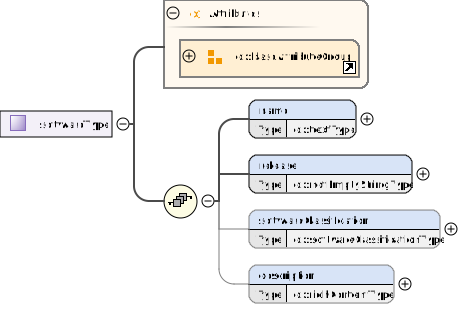
¶ Snippet from the XML schema: type definition "softwareType"
    <xs:complexType name="softwareType">
        <xs:sequence>
            <xs:element name="name" type="dx:textType"/>
            <xs:element name="release" type="dx:notEmptyStringType"/>
            <xs:element name="softwareClassification" type="dx:softwareClassificationType" minOccurs="0"/>
            <xs:element name="description" type="dx:richContentType" minOccurs="0"/>
        </xs:sequence>
        <xs:attributeGroup ref="dx:baseAttributeGroup"/>
    </xs:complexType>
¶ Description of the content
See the list of abbreviations here
| Element (Element type) |
Use | Description |
|---|---|---|
| dx:name (dx:textType) |
[M] | This element specifies the name of the calibration item. |
| dx:release (dx:notEmptyStringType) |
[M] | The release of the software. Possible specifications: Release, version, etc. This serves to uniquely identify the software in connection with the name. |
| dx:softwareClassification (dx:softwareClassificationType) |
[O] | To specify the classification of software. Allowed values are application, bios, driver, editor, firmware, library, os, other. |
| dx:description (dx:richContentType) |
[O] | Other information not specified in the elements dx:name is specified here in order to describe the calibration item. |
¶ Attributes
| Attribute | Use | Description |
|---|---|---|
| dx:baseAttributeGroup | [O] | An attribute group called "baseAttributeGroup" is referenced here. This attribute group contains a set of attributes that are commonly used in elements of the DX. An attribute group is a reusable collection of attributes. |
¶ Examples
The examples show extracts from digital documents.
¶ Example 1
In this example, the software "Notepad++" was used to create the digital document.
Only the mandatory fields have been filled in. Here is the result:
<dx:software>
  <dx:name>Notepad++ (32-bit)</dx:name>
  <dx:softwareClassification>editor</dx:softwareClassification>
  <dx:release>v7.7.1</dx:release>
</dx:software>