¶ dx:formulaType
The data block dx:formulaType is used to insert formulas and equations into the measurement result area of the DX.
Please keep in mind that there are two different types of formula in codes. LaTeX and Presentation MathML is used for formulas in intention of presentation. Content MathML is machine-interpretable. As a good practice it is good to use machine interpretable formulas in data fields of the DX and presentational formulas in text fields of the DX.
¶ Tree structure
The tree structure of the type dx:formulaType has the following appearance:
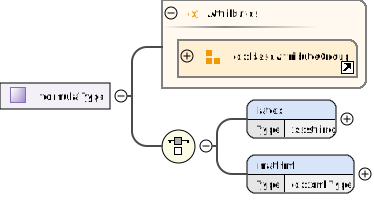
¶ Snippet from the XML schema: type definition "formulaType"
    <xs:complexType name="formulaType">
        <xs:choice>
            <xs:element name="latex" type="xs:string"/>
            <xs:element name="mathml" type="dx:xmlType"/>
        </xs:choice>
        <xs:attributeGroup ref="dx:baseAttributeGroup" />
    </xs:complexType>
¶ Description of the elements
See the list of abbreviations here
| Element (Element type) |
Use | Description |
|---|---|---|
| dx:latex (xs:string) |
[O] | This element can be used to store a latex-formatted string. |
| dx:mathml (dx:xmlType) |
[O] | The data block dx:xmlType is used to insert formulas and equations into the measurement result area of the DX. |
¶ Attributes
| Attribute | Use | Description |
|---|---|---|
| dx:baseAttributeGroup | [O] | An attribute group called "baseAttributeGroup" is referenced here. This attribute group contains a set of attributes that are commonly used in elements of the DX. An attribute group is a reusable collection of attributes. |